 Skip to content

Quick answer
To use 51 Game on an iPhone or iPad, open the genuine site in Safari, tap the Share icon, choose “Add to Home Screen” and tap Add. You get an app-style icon that opens 51 Game full-screen with the same account as Android and the web. You do not need to install configuration profiles or “enterprise apps”, and you should not.
Is there a 51 Game app for iPhone?
iPhone users normally access 51 Game through Safari and an Add to Home Screen shortcut rather than an App Store app. Real-money gaming apps of this kind are not usually listed on the Indian App Store. The home-screen shortcut works like an app: one tap, no browser bars, and your login is remembered by Safari.
How do you add 51 Game to your iPhone home screen?
How to add 51 Game to an iPhone home screen
- Open Safari (not Chrome) on your iPhone.
- Go to the 51 Game site using a trusted link, such as the button on this page.
- Tap the Share icon (square with an arrow) at the bottom of Safari.
- Scroll and tap “Add to Home Screen”.
- Rename it if you like and tap Add.
- Open the new icon and log in with your phone number or email.
Ready to try 51 Game?
Register with invite code 235975286246 already filled in, or log in to your account. Adults 18+ only.
What about the Dragons Assistant “Add to Desktop” button?
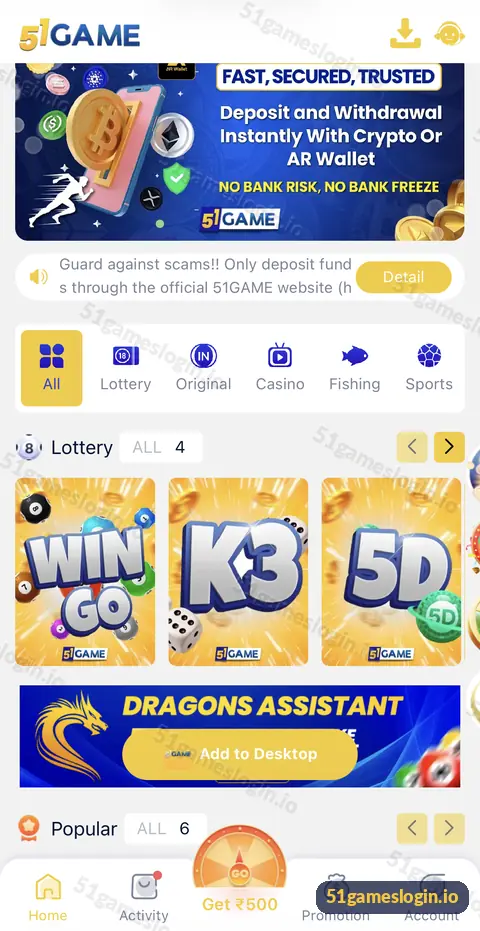
The home screen includes a Dragons Assistant banner with an “Add to Desktop” button, which helps you create a quick-access shortcut. On iPhone, Safari may still ask you to finish through the Share menu. Either way, the result is a shortcut, not a separate app with special permissions.
What should iPhone users avoid?
| Request | Why to avoid it |
|---|---|
| “Install this profile” | Configuration profiles can control device settings |
| “Trust this enterprise developer” | Bypasses Apple’s normal app checks |
| Paid “iOS version” downloads | Not needed; the shortcut is free |
| App Store listings with a similar name | May be unrelated apps |
How do you fix 51 Game on iPhone?
- Icon opens a blank page: delete the shortcut and add it again from Safari.
- Logged out often: check Settings, Safari, and make sure cookies are not blocked for the site.
- Slow loading: switch between Wi-Fi and mobile data.
- Payments not opening UPI apps: make sure the UPI app is installed and updated.
Android users should read the APK guide, and anyone can compare options in the download guide and 51 Game online. The 51 game ios section of our homepage links all app guides.
Who is the 51 Game iOS guide for?
It is for iPhone and iPad users who want quick access without unsafe installs.
- iPhone users who could not find an App Store app.
- Players offered an “iOS profile” or “TestFlight link”.
- iPad users who want a larger screen.
Does the iPhone shortcut work like a real app?
For everyday use, yes. The home-screen icon opens 51 Game full-screen, keeps your login through Safari’s cookies and lets UPI payments hand off to your UPI apps. It does not use extra storage or need updates; it always loads the current version. The only practical differences are that notifications may be limited and that clearing Safari data will log you out. For most players, those are small trade-offs for a safer setup.
What else do people ask about 51 Game iOS?
Can I download 51 Game on iPhone?
Use Safari and Add to Home Screen to create an app-style shortcut.
Is 51 Game on the App Store?
Not as far as we know in India. Be wary of similar-named App Store apps.
Does the iPhone shortcut use the same account?
Yes. One account works on iPhone, Android and desktop.
Do I need to install a profile for 51 Game?
No. Never install configuration profiles for gaming shortcuts.
Why use Safari instead of Chrome on iPhone?
Add to Home Screen is most reliable from Safari’s Share menu.
Can I deposit on iPhone?
Yes. UPI and other deposit methods work through the same wallet screen.
What are the key takeaways?
- iPhone users add 51 Game through Safari, Share, Add to Home Screen.
- The shortcut works like an app with the same account.
- Never install profiles or trust unknown enterprise developers.
- Re-add the shortcut if it stops loading.
