 Skip to content

Quick answer
51 Game customer care is reached through the headset icon at the top right of the home screen, which opens the platform’s in-app support. Before you message, gather your account ID or phone number, the order or UTR number and a screenshot of the issue. Genuine support never asks for your password, OTP or UPI PIN, and never asks you to pay to “unlock” a withdrawal.
Where is 51 Game customer care?
The support icon is the round headset face beside the yellow download icon on the home screen. It opens a chat with the platform’s service team. The login screen also points users to customer service for forgotten passwords, so it is the official first stop for any account or payment question.
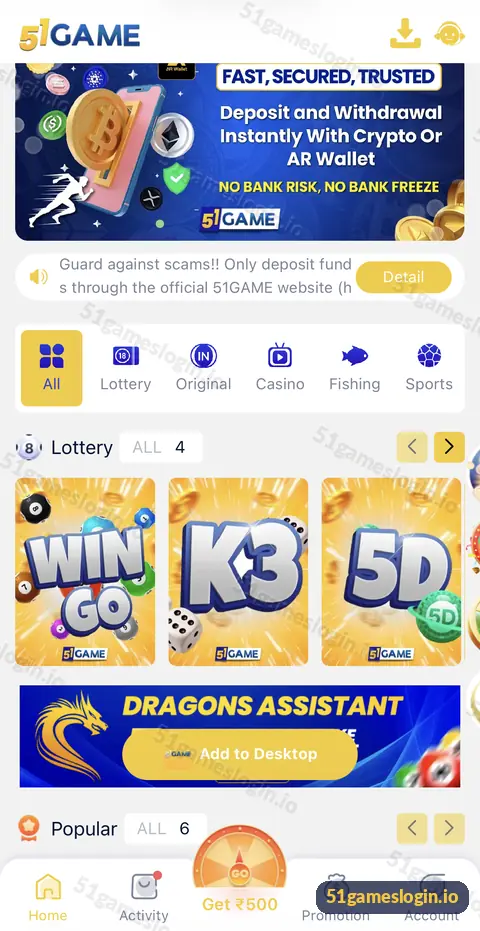
This website is an independent guide, so we cannot access your account or fix transactions. Always go through the in-app support for anything involving your balance.
How do you contact 51 Game support effectively?
How to contact 51 Game customer care
- Log in first. Support can see more when you contact them from your account.
- Tap the headset icon on the home screen.
- Choose the right topic if a menu appears: deposit, withdrawal, account or other.
- Describe the issue in one or two lines. Example: “UPI deposit of ₹500 on 12 Oct at 8:40 pm not credited.”
- Attach proof. A screenshot of your UPI payment showing the UTR, or of the error message.
- Note the ticket or chat reference. Keep the conversation open until it is resolved.
Ready to try 51 Game?
Register with invite code 235975286246 already filled in, or log in to your account. Adults 18+ only.
What information should you prepare?
| Issue | What to send |
|---|---|
| Deposit not credited | Amount, time, method, UTR number, payment screenshot |
| Withdrawal pending or failed | Amount, time, method, Withdrawal history screenshot |
| Login problem | Registered phone or email, the error text |
| Bonus or VIP question | Screenshot of the offer or VIP page |
| Suspected unauthorised access | Time noticed, what changed, request to secure the account |
How do you spot fake 51 Game customer care?
Fake support numbers are one of the most common scams on gaming platforms.
- Genuine support works inside the app. Be wary of “helpline numbers” found in search results or comments.
- Nobody genuine asks for your OTP, UPI PIN or password.
- Nobody genuine asks you to pay a “tax”, “unlock fee” or “verification deposit” to release a withdrawal.
- Telegram accounts using the logo are not proof of anything.
If you were contacted by someone claiming to be support, stop replying and check your account through the genuine app. The account security guide explains what to do next.
Which problems can you fix without support?
Many issues have quick self-help fixes: login problems, OTP not received, pending deposits and withdrawal failures. Try those first, then contact support with your evidence ready. The 51 game customer care section of our homepage links every help page.
Who is the 51 Game customer care guide for?
It is for players with an issue that self-help has not solved, and for anyone checking whether a “support” contact is genuine.
- Players with stuck deposits or withdrawals.
- Players locked out of their account.
- Anyone contacted by a stranger claiming to be support.
How do you write a support message that gets solved faster?
One clear message with evidence beats five short messages without it. Start with what happened, then when, then how much, then what you want. For example: “I deposited ₹500 by UPI-QR at 20:41 on 12 October. My bank shows it debited (UTR 1234…). Deposit history shows pending. Please credit or refund.” Attach the screenshot in the same message.
Stay polite and in the same chat thread so the history stays together. If the agent asks for more information, give it once and clearly. Avoid opening new chats for the same issue, which can reset your place in the queue. And keep your own record: time, amount, UTR, chat reference. If the problem takes days, that record makes every follow-up quicker.
What else do people ask about 51 Game Customer Care?
How do I contact 51 Game customer care?
Tap the headset icon at the top right of the home screen to open in-app support.
Does 51 Game have a phone helpline?
The interface we reviewed uses in-app support. Treat phone numbers posted elsewhere with caution.
Is 51 Game support available 24 hours?
Response times can vary. Send full details in one message so the team can act quickly.
Can 51gameslogin.io help with my account?
No. We are an independent guide and cannot access accounts or payments.
Support asked for my OTP. Is that normal?
No. Never share an OTP, password or UPI PIN with anyone.
What if support does not reply?
Keep your evidence, avoid repeated deposits and follow up in the same chat thread.
What are the key takeaways?
- Use the headset icon inside the app for genuine 51 Game support.
- Send amount, time, method, UTR and a screenshot in your first message.
- Genuine support never asks for OTP, PIN, password or unlock fees.
- Try the self-help troubleshooting guides first for faster fixes.
