 Skip to content

Quick answer
To download 51 Game, open the genuine 51 Game site in your phone browser and tap the yellow download icon at the top right of the home screen. Android phones receive the app file; iPhone users add the site to the home screen through Safari. You can also use the “Add to Desktop” button on the Dragons Assistant banner. The app is not on Google Play, so avoid download links shared in chats.
Where is the official download button in 51 Game?
The download icon is the yellow downward arrow beside the support headset in the top-right corner of the home screen. A second route is the Dragons Assistant banner further down the home page, which has an “Add to Desktop” button for quick access.
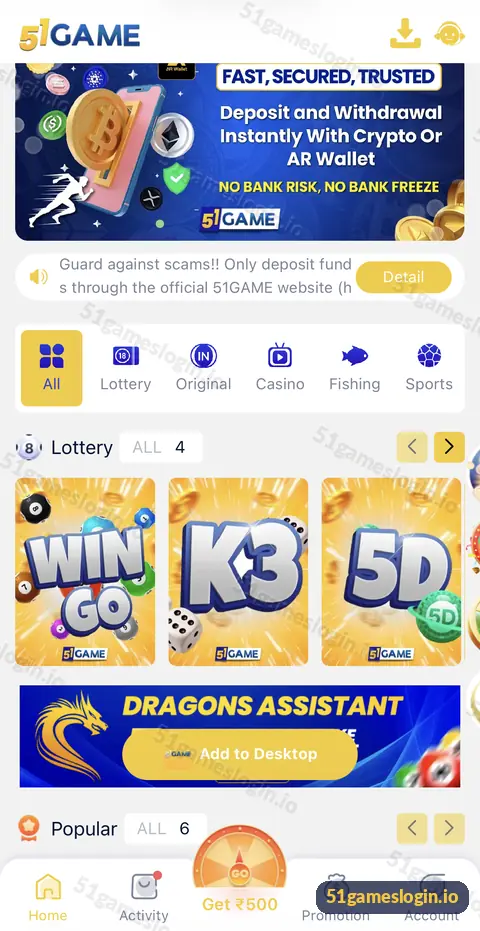
How do you download 51 Game on each device?
| Device | Method | Guide |
|---|---|---|
| Android phone | Download icon gives the app file to install | 51 Game APK |
| iPhone / iPad | Safari, Share, Add to Home Screen | 51 Game iOS |
| Windows or Mac | Use the website in Chrome, Edge or Safari | 51 Game online |
How to download 51 Game on Android
- Open the 51 Game site in Chrome. Start from a trusted link such as the button on this page.
- Tap the yellow download icon. Confirm the download when Chrome asks.
- Open the downloaded file. Find it in Downloads or the notification bar.
- Allow install from this source. Android asks once; allow it for Chrome only.
- Tap Install, then Open. Log in with your phone number or email.
- Switch the permission off again. Settings, Apps, Special access, Install unknown apps.
Ready to try 51 Game?
Register with invite code 235975286246 already filled in, or log in to your account. Adults 18+ only.
Why is 51 Game not on the Google Play Store?
Google Play restricts real-money gaming apps in India, so most platforms like 51 Game distribute their Android app from their own websites. That is normal for this category, but it puts the responsibility on you to download from the right place. Fake copies are common.
How do you avoid fake 51 Game downloads?
- Download only from the icon inside the genuine site, never from a link sent on WhatsApp, Telegram or YouTube.
- Be suspicious of files called “51 Game Mod”, “Hack” or “Predictor”. See why these fail.
- If an app asks for SMS, contacts or accessibility permissions it does not need, uninstall it.
- After installing, check your login and balance match what you see on the website.
What if the 51 Game download does not work?
- Download blocked: Chrome may warn about the file type; check the source, then choose Download anyway only if it came from the genuine site.
- App not installed: remove any older version and free at least 200 MB of storage.
- Parse error: the file is incomplete. Download again on a stable connection.
- App opens then closes: restart the phone and reinstall.
If you are not sure you need the app at all, the browser works with the same account. Our 51Game app guide compares both, and the 51 game download section of the homepage lists every related page.
Who is this 51 Game download guide for?
It is for anyone who wants the platform on their phone or computer and wants to avoid fake files.
- Android users installing for the first time.
- iPhone users looking for an app-like shortcut.
- Players replacing an old or broken install.
How can you check a download before installing?
Look at where it came from, what it is called and what it asks for. A genuine file comes from the yellow download icon on the platform’s own home screen. Its name should be plain, without words like mod, hack, VIP or predictor. During installation, Android shows the permissions an app wants; a gaming app does not need SMS, contacts or accessibility access.
After installing, open the app and log in. Your balance, history and VIP level should match exactly what you see on the website. If anything differs, or if the app asks you to “verify” by entering your UPI PIN or OTP, uninstall it at once and change your password. Fake apps often look identical at first glance; behaviour is what gives them away.
What else do people ask about 51 Game Download?
Is 51 Game download free?
Yes. The app and registration cost nothing.
How big is the 51 Game app?
File size changes with updates. Keep around 200 MB free to install and run it comfortably.
Can I download 51 Game on iPhone?
iPhone users normally add the site to the home screen from Safari rather than installing a file.
Does 51 Game work on a laptop?
Yes, through the website in any modern browser.
Is it safe to allow unknown apps?
Allow it only for the browser you used, only for this install, and turn it off afterwards.
How do I update 51 Game?
Download the latest file from the same in-site icon and install it over the old one.
What are the key takeaways?
- The download icon sits at the top right of the 51 Game home screen.
- Android gets an app file; iPhone uses Add to Home Screen.
- The app is not on Google Play, so only download from the genuine site.
- Switch off “install unknown apps” after you finish.
