 Skip to content

Quick answer
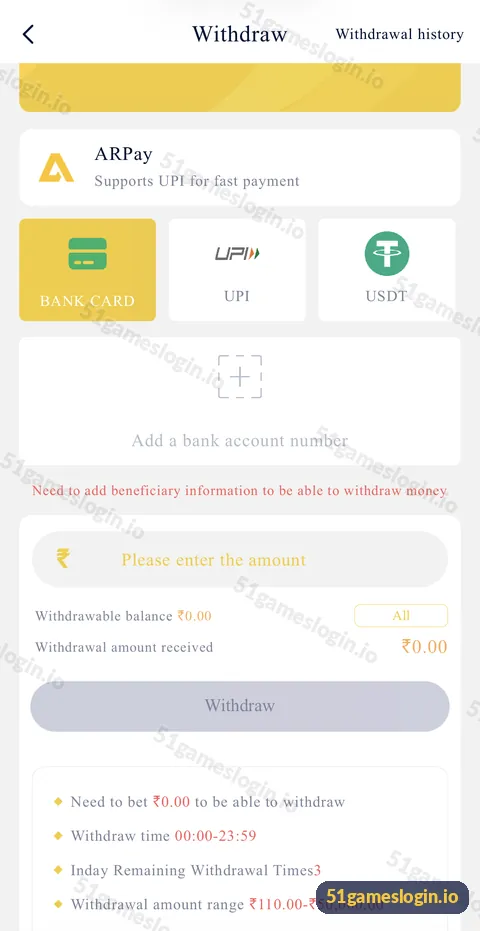
To add a bank account on 51 Game, open Withdraw, choose Bank Card, UPI or USDT, tap “Add a bank account number” and enter the beneficiary details exactly as your bank shows them, in your own name. The withdraw screen says “Need to add beneficiary information to be able to withdraw money”, so this step is required before your first payout. Correct details are the best way to avoid failed withdrawals.
Why do you need to add a beneficiary on 51 Game?
The beneficiary is where your withdrawals are sent, so the platform requires it before any payout. Until you add one, the withdraw screen shows an empty card with a “+” and the message about beneficiary information.
| Method | Details usually requested |
|---|---|
| Bank card | Account holder name, account number, IFSC, bank name |
| UPI | UPI ID (for example name@bank) and holder name |
| USDT | Wallet address and network |
How do you add a bank account to 51 Game?
How to add a bank account on 51 Game
- Log in and open Account, then Withdraw.
- Tap Bank Card (or UPI / USDT).
- Tap “Add a bank account number”.
- Enter the account holder’s name exactly as on your passbook or bank app.
- Enter the account number carefully; type it twice if asked.
- Enter the IFSC code. Find it in your bank app, passbook or cheque.
- Save the beneficiary and confirm any verification step.
- Make a small test withdrawal to confirm everything works.
Ready to try 51 Game?
Register with invite code 235975286246 already filled in, or log in to your account. Adults 18+ only.
What mistakes cause beneficiary problems?
| Mistake | Result | How to avoid |
|---|---|---|
| Name differs from bank records | Payout fails or is returned | Copy the name from your bank app |
| One digit wrong in account number | Failed or misdirected payment | Re-read every digit |
| Old IFSC after a branch merger | Failure | Check the current IFSC in your bank app |
| UPI ID of someone else | Review or rejection | Use your own UPI ID |
| Wrong USDT network | Lost funds | Match the network shown |
Can you change your 51 Game bank account?
Beneficiary changes are usually possible but may need customer service and verification. Platforms restrict changes to stop account takeovers, so do not wait until you have a large balance to fix a mistake. If you did not make a change you see, contact support immediately and change your password.
How do you keep your bank details safe?
- Never send bank details to anyone in chat.
- Only enter them inside your logged-in withdraw screen.
- Never share your UPI PIN or internet banking password; the platform does not need them.
- Watch for unexpected changes after logging in on a new device.
Next steps: read the withdrawal guide, the withdrawal problem fixes and the account security guide. The 51 game bank account section on our homepage links them all.
Who is the add bank account guide for?
It is for players preparing their first withdrawal and anyone whose payout failed because of beneficiary details.
- Players seeing “Need to add beneficiary information”.
- Players switching from UPI to bank card or the reverse.
- Anyone who entered a detail incorrectly.
How do you find your exact account name and IFSC?
Open your bank’s mobile app and look at account details, or check your passbook’s first page. The account holder name there is the version to copy, including initials and spacing. The IFSC is an 11-character code that identifies your branch; it appears in the same place and on your cheque book. If your branch merged with another, the IFSC may have changed, so always use the current one from your bank app. For UPI, open your UPI app’s profile to see your exact UPI ID.
What else do people ask about 51 Game Bank Account?
How do I add a bank account in 51 Game?
Open Withdraw, choose Bank Card, tap “Add a bank account number” and enter your name, account number and IFSC.
Can I add a UPI ID instead of a bank account?
Yes. The withdraw screen offers UPI as a method alongside bank card and USDT.
Can I use my family member’s bank account?
Use an account in your own name. Third-party accounts often cause failures and reviews.
Why does 51 Game say I need beneficiary information?
You have not yet added a payout destination. Add one before withdrawing.
How do I change my bank account on 51 Game?
Check the withdraw settings; if editing is locked, contact customer service.
Is it safe to give my account number?
Your account number and IFSC are needed to receive money. Never share your PIN or passwords.
What are the key takeaways?
- A beneficiary is required before your first withdrawal.
- Bank card, UPI and USDT are the payout options.
- Copy your name and IFSC exactly from your bank records.
- Fix mistakes early and test with a small withdrawal.
