 Skip to content

Quick answer
If you forget your 51 Game password, tap “Forgot password?” on the login screen and follow the verification steps for your registered phone number, or contact customer service through the headset icon, as the login screen advises. Once you are back in, set a new password you have not used anywhere else. Never share your OTP with anyone offering to “reset” your account for you.
How do you reset a forgotten 51 Game password?
How to reset your 51 Game password
- Open the 51 Game login screen.
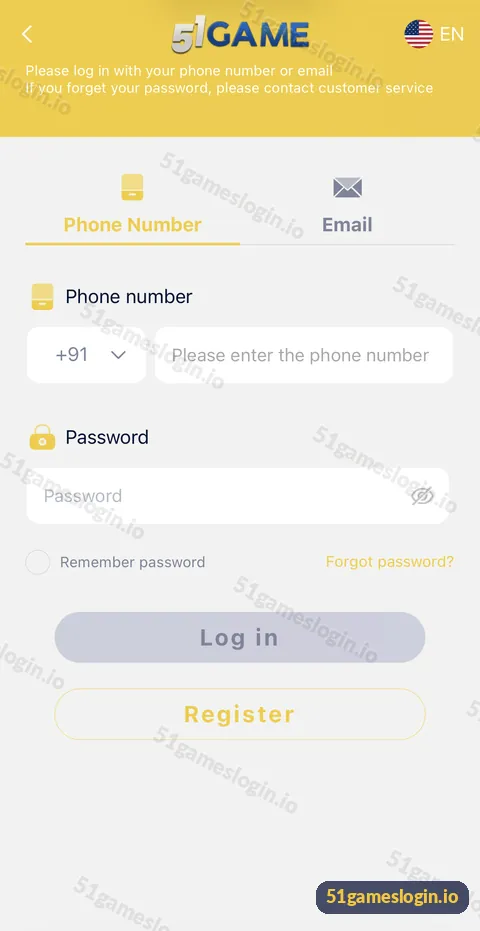
- Tap “Forgot password?” It sits on the right, under the password field.
- Enter your registered +91 phone number (or email, if offered).
- Request a verification code and enter it when the SMS arrives.
- Set a new password and confirm it.
- Log in with the new password.
- If the reset option does not work, contact customer service through the headset icon.
Ready to try 51 Game?
Register with invite code 235975286246 already filled in, or log in to your account. Adults 18+ only.
What does the login screen say about forgotten passwords?
The header of the login screen reads: “Please log in with your phone number or email. If you forget your password, please contact customer service.” That tells you customer service is a supported route for recovery. When you contact them, have your registered phone number ready and be prepared to answer questions about your account. Genuine support will not ask for your old password or your UPI PIN.
How do you choose a strong new password?
| Do | Avoid |
|---|---|
| 8+ characters with letters and numbers | Birthdays, phone numbers, 12345678 |
| A password used only for 51 Game | The same password as email or UPI |
| A password manager or a written note kept safe | Saving it in chat messages |
Why might the reset not work?
- Wrong number: you may have registered with a different number or email.
- No SMS code: check the OTP problem guide.
- Too many attempts: wait a while before trying again.
- Account restricted: contact customer service directly.
What should you do after resetting?
Check that nothing has changed in your account while you were locked out. Review your balance, Deposit and Withdrawal history and beneficiary details. If something looks wrong, contact support immediately. Then read the account security guide. For normal sign-in, see the 51Game login guide, or the login problem fixes if you still cannot get in. The 51 game forgot password entry on our homepage links all account help.
Who is the forgot password guide for?
It is for players who cannot remember their password, and for anyone who wants to reset it after a security worry.
- Players returning after a long break.
- Players switching phones.
- Anyone who may have typed their password on a fake site.
How do you avoid forgetting your password again?
Use a password manager or a private written note kept somewhere safe at home. Most phones include a built-in password manager that can store your 51 Game password securely behind your screen lock. If you prefer paper, keep it away from your phone and never photograph it. Avoid storing passwords in chat apps, email drafts or screenshots, which are the first places an attacker looks if your phone is compromised. A unique, stored password is both easier to remember and safer than a simple one reused everywhere.
What else do people ask about 51 Game Forgot Password?
Where is Forgot password on 51 Game?
On the login screen, to the right under the password field.
Can customer service reset my password?
The login screen says to contact customer service if you forget your password. Use the in-app headset icon.
Do I need my phone to reset the password?
Usually yes, because a verification code is sent to your registered number.
I changed my phone number. How do I recover my account?
Contact customer service with your account details; they decide how to verify you.
Will resetting my password affect my balance?
No. Your balance stays the same.
Someone offered to reset my password if I send the OTP. Is that safe?
No. Never share an OTP. That is how accounts are stolen.
What are the key takeaways?
- Use “Forgot password?” on the login screen or contact customer service.
- A verification code is sent to your registered number.
- Choose a new, unique password of 8+ characters.
- After resetting, review your history and beneficiary details.
