 Skip to content

Quick answer
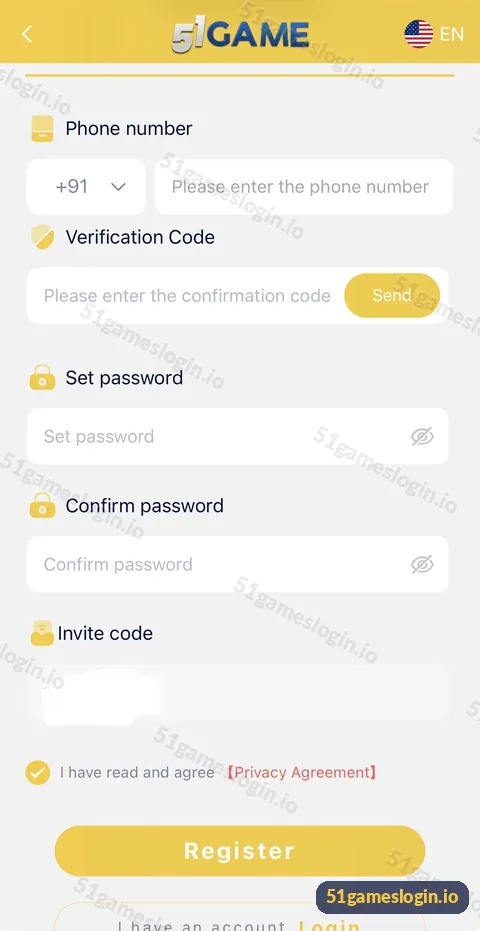
To register on 51 Game, enter your +91 mobile number, tap Send to get an SMS verification code, set and confirm a password, keep the invite code, tick the Privacy Agreement and tap Register. The whole form fits on one screen and takes about two minutes. Use a number you control long-term, because it becomes your login and recovery route.
What do you need before you register on 51 Game?
You need a working Indian mobile number that can receive SMS, a password you have not used elsewhere and about two minutes. You do not need to upload documents or add a bank account at this stage; beneficiary details are added later, only when you want to withdraw.
- A +91 mobile number in your own name, with SMS working.
- A new password of at least eight characters.
- The invitation code (already filled in when you use our Register button).
- You must be 18 or older.
How do you create a 51 Game account step by step?
How to register on 51 Game
- Tap Register on this page. The sign-up form opens with the invitation code pre-filled.
- Check the country code reads +91. Then type your 10-digit mobile number.
- Tap Send next to Verification Code. Wait for the SMS and type the code into the confirmation box.
- Set password. Type your new password in the Set password field.
- Confirm password. Type it again exactly. Use the eye icon to check both match.
- Check the Invite code box. Leave the pre-filled code in place.
- Tick “I have read and agree [Privacy Agreement]”. Read it first; the Register button needs this tick.
- Tap Register. Your account is created and you are signed in.
Ready to try 51 Game?
Register with invite code 235975286246 already filled in, or log in to your account. Adults 18+ only.
What does each field on the 51 Game register form do?
| Field | Purpose | Tip |
|---|---|---|
| Phone number (+91) | Your account ID and login | Do not add a leading 0 |
| Verification Code + Send | Proves you own the number | Codes expire; request a new one if it times out |
| Set password | Protects your account | Avoid birthdays and 12345678 |
| Confirm password | Catches typing errors | Must match exactly |
| Invite code | Links you to the inviter | Usually cannot be changed later |
| Privacy Agreement | Required consent | Read it before ticking |
Why is my 51 Game registration not working?
Most failures come from an already-registered number, an expired code or mismatched passwords.
- “Phone already registered”: you have an account. Go to the 51Game login page or use forgot password.
- No SMS code: see the OTP problem guide.
- Passwords do not match: retype both fields slowly.
- Register button greyed out: the Privacy Agreement box is not ticked or a field is empty.
- Page will not load: switch network or try another browser.
What should you do right after registering?
Before you deposit, set your limits and learn where everything is. Open the Account tab, look at the wallet, open the VIP page and read the withdrawal rules so there are no surprises later. Then read the deposit guide and decide on a small first amount. If you want the bigger picture first, our 51 game register overview on the homepage connects every next step.
Who is the 51 Game register guide for?
It is for adults who have decided to create an account and want to complete the form correctly the first time.
- First-time users with a +91 number.
- Friends joining through an invite link.
- Anyone whose earlier attempt failed.
What should you know about the Privacy Agreement?
The tick box next to “I have read and agree [Privacy Agreement]” is required, and it is worth reading. It explains what the platform does with your phone number and account data. Tap the red Privacy Agreement link to open it before you tick. Skim for three things: what information is collected, whether it is shared with partners, and how you can close your account. Taking two minutes here is part of making an informed choice.
Also note what the form does not ask for. There is no request for your bank PIN, Aadhaar upload or card number at registration. If a page claiming to be the 51 Game sign-up asks for any of those, you are not on the genuine form. Leave it and use a trusted link such as the Register button on this page.
What else do people ask about 51 Game Register?
Is 51 Game registration free?
Yes. Creating an account costs nothing.
Can I register on 51 Game without a phone number?
The registration form we reviewed requires a +91 phone number and SMS code. Email can be used for login if it is linked to your account.
Can I add an invite code after registering?
Usually not. The invite code is set when the account is created, so check it before tapping Register.
How long does 51 Game registration take?
About two minutes if the SMS code arrives promptly.
Can I have two 51 Game accounts?
Platforms like this normally allow one account per person and phone number. Duplicate accounts can be blocked.
Do I need KYC to register?
No documents are requested on the registration form. Withdrawal needs beneficiary details added later.
What are the key takeaways?
- Registration needs a +91 number, an SMS code and a password entered twice.
- The invite code field is pre-filled when you use our Register button.
- Tick the Privacy Agreement or the Register button will not work.
- Read the wallet and withdrawal rules before your first deposit.
