 Skip to content

Quick answer
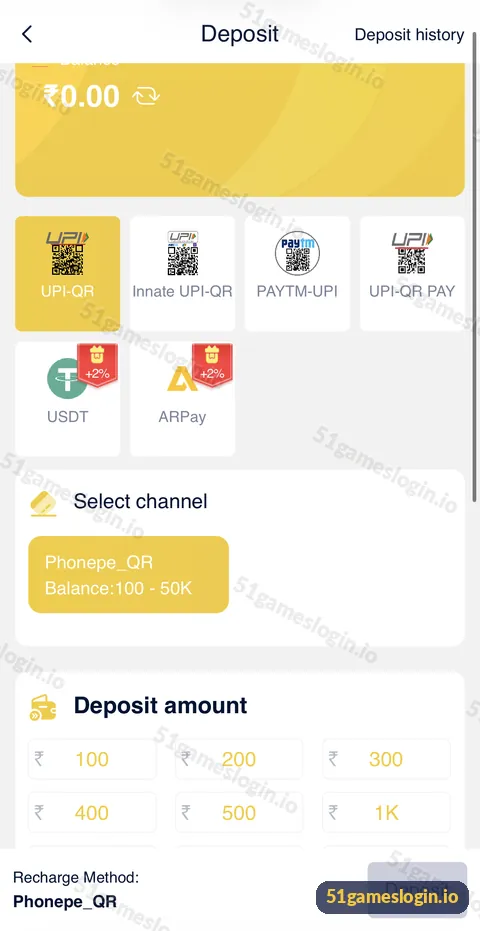
If a 51 Game deposit is pending or missing, do not pay again. Check Deposit history at the top right of the deposit screen, find the UTR or transaction ID in your UPI app, wait a short while for bank confirmation, then send customer care the amount, time, method and a payment screenshot. Most delays clear once the payment is matched to your order.
Why is my 51 Game deposit not showing?
A deposit can be delayed at three points: your bank, the payment channel or the platform’s matching of the payment to your order.
| Status or symptom | What it usually means | What to do |
|---|---|---|
| Money debited, balance unchanged | Payment not yet matched | Wait, then send UTR to support |
| Deposit history shows pending | Order awaiting confirmation | Do not pay again; check later |
| Deposit history shows failed | Payment not completed or expired | Check your bank; money is usually reversed by the bank |
| No order in history | Payment made outside the order flow | Contact support with full proof |
| Paid a different amount | Amount mismatch with the order | Send screenshot to support |
| Paid an old QR | QR codes can expire | Always generate a new order |
How do you fix a pending 51 Game deposit?
How to fix a 51 Game deposit problem
- Stop. Do not make a second payment.
- Open Deposit history from the deposit screen.
- Open your UPI app and copy the UTR or transaction reference number.
- Check your bank statement to confirm the debit.
- Wait a reasonable time for the bank to confirm; some payments take longer.
- Contact customer care through the headset icon with amount, time, method, UTR and screenshot.
- Keep the chat open until the balance is credited or the payment is refunded.
Ready to try 51 Game?
Register with invite code 235975286246 already filled in, or log in to your account. Adults 18+ only.
How do you avoid deposit problems next time?
- Always start a new order inside your logged-in wallet; never reuse an old QR.
- Pay the exact amount shown on the order.
- Finish the payment within the time window shown.
- Use one method per order; do not switch apps halfway through.
- Keep a screenshot of every successful UPI payment.
- Never pay a UPI ID or QR sent in a chat. That money cannot be traced to your account.
When is a deposit problem actually a scam?
If you paid a person, a Telegram “agent” or a QR from outside the app, the platform cannot see that payment. Report it to your bank and the national cyber-crime helpline (1930) as soon as possible, and keep all chat screenshots. Read the website guide to make sure you are always on the genuine site.
Where can you learn more?
The 51 Game deposit guide explains every method and channel. If you use crypto, read the USDT guide and ARPay guide. Our 51 game deposit problem entry on the homepage links all money help pages.
Who is the deposit problem guide for?
It is for players whose payment left their bank but has not appeared in their balance, or whose order shows pending or failed.
- UPI users with a missing deposit.
- Crypto users waiting for confirmations.
- Anyone who paid outside the app by mistake.
How long should you wait before contacting support?
Give a UPI payment a short time to settle, then contact support with evidence rather than waiting days. Bank and gateway delays usually resolve within minutes, though busy periods take longer. If Deposit history still shows pending after a reasonable wait, send support your UTR and screenshot. For crypto, check the transaction hash on a blockchain explorer first; if the network shows it confirmed and the balance has not updated, send the hash to support. Acting promptly with full details is the quickest route to a resolution.
What else do people ask about 51 Game Deposit Problem?
How long does a 51 Game deposit take?
UPI deposits usually reflect within minutes, but bank or channel delays happen. There is no fixed guarantee.
Money was deducted but not added to 51 Game. What should I do?
Do not pay again. Send the UTR, amount, time and screenshot to customer care.
What is a UTR number?
A unique reference for your UPI or bank transfer, shown in your UPI app’s transaction details.
Will I get my money back if a deposit fails?
Failed UPI payments are usually reversed by your bank. Matched-but-delayed payments are credited after review.
Can I cancel a 51 Game deposit?
Once a UPI payment is approved it cannot be cancelled from the app. Contact support if there is a problem.
Why does my deposit show pending for a long time?
The payment may not have been matched yet. Send proof to support rather than paying again.
What are the key takeaways?
- Never pay twice for a pending deposit.
- Collect the UTR, amount, time and screenshot.
- Use Deposit history and in-app customer care.
- Only pay through a fresh order inside your wallet.
