 Skip to content

Quick answer
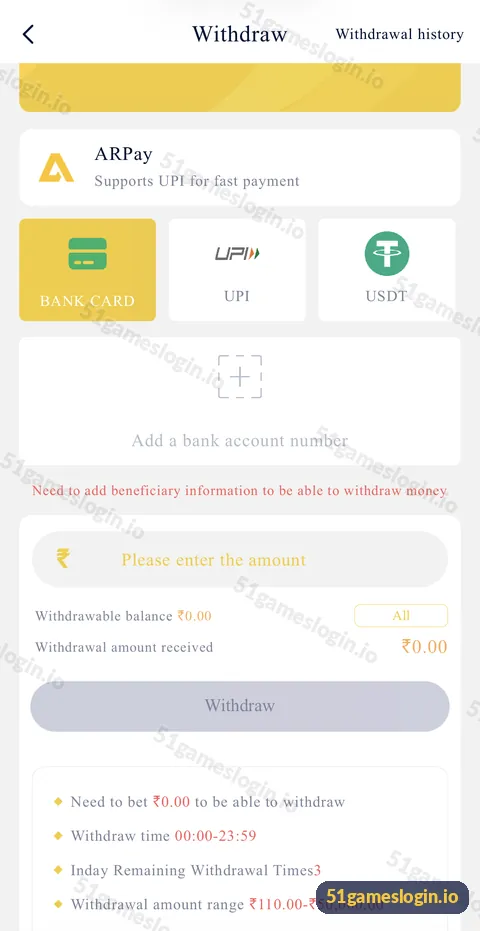
A 51 Game withdrawal usually fails or waits for one of six reasons: an unmet betting requirement, no beneficiary added, an amount outside ₹110 to ₹50,000, the three-per-day limit reached, incorrect bank or UPI details, or a platform review. Check the withdrawal screen and Withdrawal history first, correct the issue and only then try again or contact customer care.
Why is my 51 Game withdrawal not working?
Go through this table; the withdrawal screen shows most of these conditions directly.
| Cause | How you can tell | Fix |
|---|---|---|
| Betting requirement | “Need to bet ₹X” shows above ₹0.00 | Bet the remaining amount first |
| No beneficiary | “Need to add beneficiary information” message | Add a bank account, UPI or USDT address |
| Amount too low or high | Below ₹110 or above ₹50,000 | Enter an amount within the range |
| Daily limit | “Inday Remaining Withdrawal Times” shows 0 | Wait for the next day |
| Wrong details | Status failed or returned | Correct name, account, IFSC or UPI ID |
| Under review | Status pending | Wait, then contact support with proof |
| Bonus balance | Withdrawable balance lower than total | Meet bonus conditions first |
How do you fix a pending or failed 51 Game withdrawal?
How to fix a 51 Game withdrawal problem
- Open Withdrawal history at the top right of the withdraw screen and read the status.
- Check the “Need to bet” line. If it is above ₹0.00, that is the reason.
- Check your beneficiary details. Name, account number, IFSC or UPI ID must be correct and in your name.
- Check the amount is between ₹110 and ₹50,000 and within your withdrawable balance.
- Check remaining withdrawals today. The screen shows how many are left.
- Wait if it is pending. Bank processing can take time.
- Contact customer care with the amount, time, status and a screenshot if it stays pending or fails without reason.
Ready to try 51 Game?
Register with invite code 235975286246 already filled in, or log in to your account. Adults 18+ only.
What does “Withdrawal amount received” mean?
It is the amount that should arrive after any deductions. If it is lower than the amount you entered, a fee or deduction applies under the platform’s rules. Check this line before you tap Withdraw so you are not surprised later.
How do you avoid withdrawal problems?
- Add beneficiary details in your own name before you need them.
- Make a small first withdrawal to test the route.
- Avoid changing bank details right before a large request.
- Do not use multiple accounts; that can trigger reviews.
- Read bonus terms before claiming offers that add betting requirements.
What if someone asks for a fee to release your withdrawal?
That is a scam. Genuine withdrawals do not require you to send an “unlock fee”, “tax” or “verification deposit” to a person. Stop contact and report it through in-app support. See customer care and account security.
For normal steps, read the 51 Game withdrawal guide and the add bank account guide. All payout help is linked from the 51 game withdrawal problem section on our homepage.
Who is the withdrawal problem guide for?
It is for players whose withdrawal is pending, failed, rejected or blocked by a message on screen.
- Players seeing “Need to bet” above zero.
- Players with failed bank or UPI payouts.
- Anyone being asked to pay an “unlock fee”.
How do you read a failed withdrawal calmly?
Start with the status reason, not with a new request. If the reason mentions beneficiary details, fix them first. If it mentions betting requirements, check the “Need to bet” line. If there is no reason, wait for the money to return to your balance before trying again, and contact support with a screenshot. Sending repeated requests uses up your three daily withdrawals and can delay review. One correct request is faster than several hopeful ones.
What else do people ask about 51 Game Withdrawal Problem?
Why is my 51 Game withdrawal pending?
It may be waiting for bank processing or a platform review. Check Withdrawal history and contact support if it stays pending.
What does “Need to bet” mean?
The amount you must still bet before you can withdraw. It must reach ₹0.00.
Why was my withdrawal rejected?
Common reasons are wrong beneficiary details, unmet betting requirements or rules linked to bonuses. Check the status reason.
How many withdrawals can I make a day?
The screen shows three per day.
What is the minimum 51 Game withdrawal?
₹110 per request.
Should I pay a fee to release my withdrawal?
No. Requests for unlock fees from individuals are scams.
What are the key takeaways?
- Check “Need to bet”, beneficiary details, amount range and daily limit first.
- Read the status in Withdrawal history before acting.
- Add beneficiary details in your own name in advance.
- Nobody genuine asks you to pay to release a withdrawal.
